
My VS Code Terminal Got Completely Garbled Running Claude Code — Here Is the One-Line Fix
So today my VS Code terminal just broke. Not like an error broke — visually broke. Random characters floating around the screen, half the text invisible, letters scattered in places that made no sense. I was running Claude Code in it and the whole thing looked like the terminal had a stroke.
Here's what it looked like:
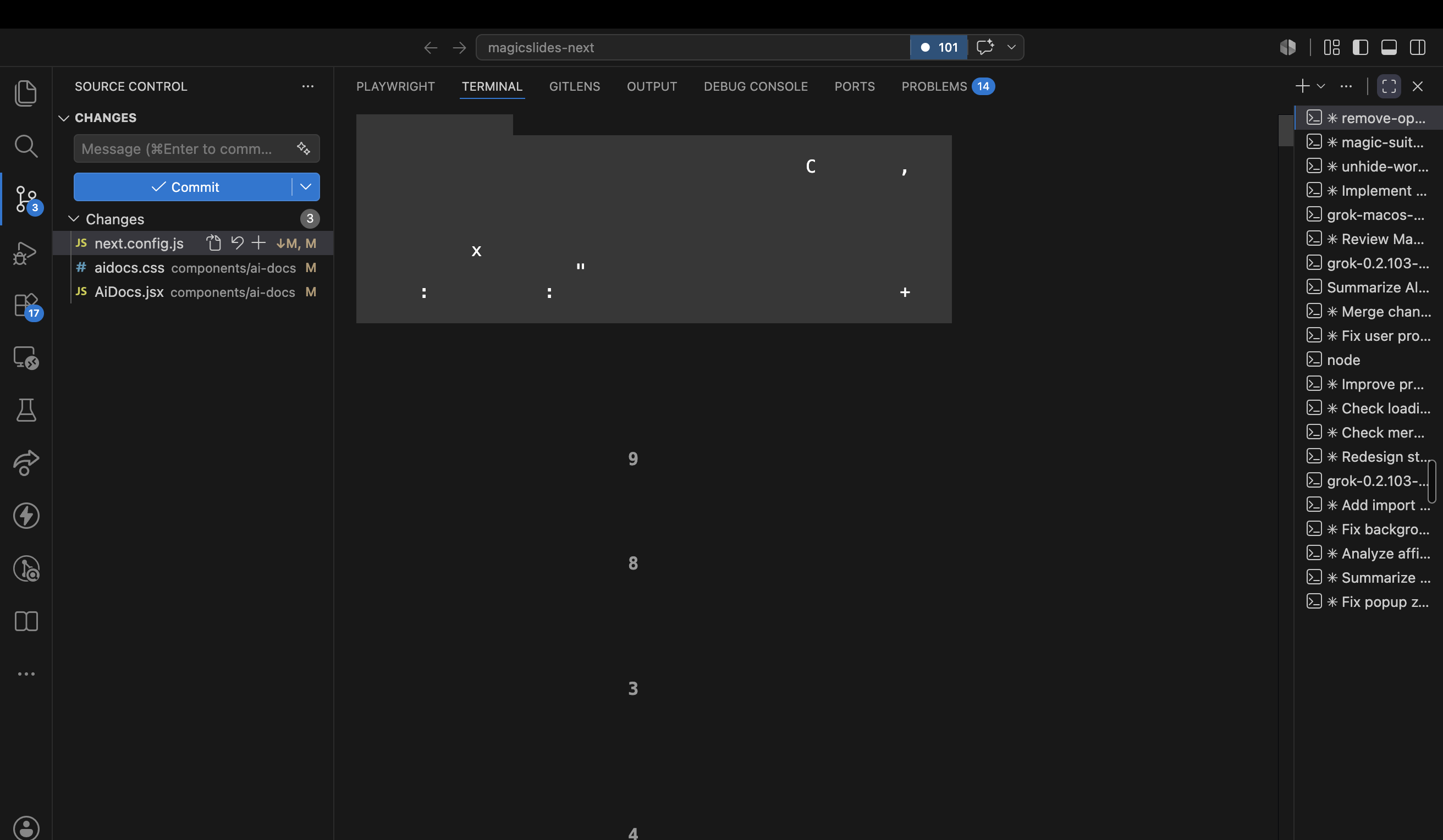
Yeah. That's supposed to be a normal Claude Code session. You can see a random "C" here, an "x" there, some numbers floating in the void. Nothing readable.
My first thought was Claude Code itself is broken. It's not. Let me explain.
What's actually happening
VS Code's terminal doesn't render text the way a normal text editor does. It uses GPU-accelerated rendering (WebGL) to draw characters fast. Which is great, until it isn't.
The bug: sometimes the GPU renderer corrupts its glyph cache — basically the texture atlas where it stores how each character looks. When that happens, it draws blanks for most characters and random leftovers for others. That's the scattered-letters look.
And here's why Claude Code triggers it more than anything else — Claude Code is a full TUI. It redraws the entire screen constantly. Spinners, streaming text, progress bars, all of it. That's way more rendering work than your average npm run dev output. So the GPU renderer gets stressed and eventually hits this corruption bug. macOS gets it the worst from what I've seen.
So yeah — not Claude's fault, not your fault. It's a known xterm.js rendering bug inside VS Code.
The fix
One line in your VS Code settings:
"terminal.integrated.gpuAcceleration": "off"
Open settings.json (Cmd+Shift+P → "Preferences: Open User Settings (JSON)"), drop that line in, save.
Then reload the window: Cmd+Shift+P → "Developer: Reload Window".
This switches the terminal from the GPU renderer to the DOM renderer. On paper the DOM renderer is slower. In practice I can't tell the difference, and it never corrupts like this.
Bonus: your running Claude Code session survives the window reload. VS Code keeps terminal processes alive across reloads. If it still looks slightly messed up after the reload, just press Ctrl+L inside the session to force a redraw. Clean terminal, session intact.
One more thing that made it worse
When I looked at my terminal sidebar, I had like 25 terminal sessions stacked up. Most of them old Claude Code sessions I never closed.
Every one of those is a live terminal instance eating memory and making rendering glitches more likely. So if your sidebar looks like a graveyard of old sessions — right click, kill the ones you're done with. Takes ten seconds.
Quick recap
- Garbled VS Code terminal with scattered characters = GPU rendering bug, not your tools
- Claude Code triggers it because it redraws the screen constantly
- Fix:
"terminal.integrated.gpuAcceleration": "off"in settings.json - Reload window, your session survives, Ctrl+L if needed
- Kill your old terminal sessions while you're at it
That's it. Took me two minutes to fix once I knew what it was. Hopefully this saves you the panic of thinking your setup is destroyed.